Schema
This section describes the schema of the data contract. It is the support for data quality, which is detailed in the next section. Schema supports both a business representation of your data and a physical implementation. It allows to tie them together.
In ODCS v3, the schema has evolved from the table and column representation, therefore the schema introduces a new terminology:
- Objects are a structure of data: a table in a RDBMS system, a document in a NoSQL database, and so on.
- Properties are attributes of an object: a column in a table, a field in a payload, and so on.
- Elements are either an object or a property.
Figure 1 illustrates those terms with a basic relational database.
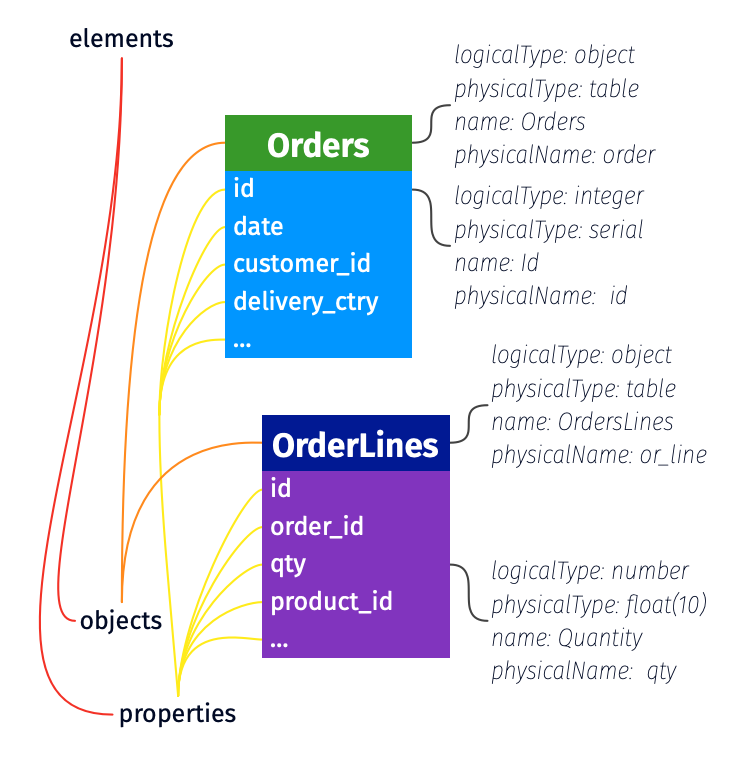
Figure 1: elements of the schema in ODCS v3.
Examples
Complete schema
schema:
  - id: tbl_obj
    name: tbl
    logicalType: object
    physicalType: table
    physicalName: tbl_1
    description: Provides core payment metrics
    authoritativeDefinitions:
      - url: https://catalog.data.gov/dataset/air-quality
        type: businessDefinition
        description: Business definition for the dataset.
      - url: https://youtu.be/jbY1BKFj9ec
        type: videoTutorial
    tags: ['finance']
    dataGranularityDescription: Aggregation on columns txn_ref_dt, pmt_txn_id
    properties:
      - id: txn_ref_dt_prop
        name: txn_ref_dt
        businessName: transaction reference date
        logicalType: date
        physicalType: date
        description: null
        partitioned: true
        partitionKeyPosition: 1
        criticalDataElement: false
        tags: []
        classification: public
        transformSourceObjects:
          - table_name_1
          - table_name_2
          - table_name_3
        transformLogic: sel t1.txn_dt as txn_ref_dt from table_name_1 as t1, table_name_2 as t2, table_name_3 as t3 where t1.txn_dt=date-3
        transformDescription: Defines the logic in business terms.
        examples:
          - 2022-10-03
          - 2020-01-28
      - id: rcvr_id_prop
        name: rcvr_id
        primaryKey: true
        primaryKeyPosition: 1
        businessName: receiver id
        logicalType: string
        physicalType: varchar(18)
        required: false
        description: A description for column rcvr_id.
        partitioned: false
        partitionKeyPosition: -1
        criticalDataElement: false
        tags: []
        classification: restricted
        encryptedName: enc_rcvr_id
      - id: rcvr_cntry_code_prop
        name: rcvr_cntry_code
        primaryKey: false
        primaryKeyPosition: -1
        businessName: receiver country code
        logicalType: string
        physicalType: varchar(2)
        required: false
        description: null
        partitioned: false
        partitionKeyPosition: -1
        criticalDataElement: false
        tags: []
        classification: public
        authoritativeDefinitions:
          - url: https://zeenea.app/asset/742b358f-71a5-4ab1-bda4-dcdba9418c25
            type: businessDefinition
          - url: https://github.com/myorg/myrepo
            type: transformationImplementation
          - url: jdbc:postgresql://localhost:5432/adventureworks/tbl_1/rcvr_cntry_code
            type: implementation
        encryptedName: rcvr_cntry_code_encrypted
Simple Array
schema:
  - name: AnObject
    logicalType: object
    properties:
      - name: street_lines
        logicalType: array
        items:
          logicalType: string
Array of Objects
schema:
  - id: another_obj
    name: AnotherObject
    logicalType: object
    properties:
      - id: x_prop
        name: x
        logicalType: array
        items:
          logicalType: object
          properties:
            - id: id_field
              name: id
              logicalType: string
              physicalType: VARCHAR(40)
            - id: zip_field
              name: zip
              logicalType: string
              physicalType: VARCHAR(15)
Definitions
Schema (top level)
| Key | Type | UX label | Required | Description |
|---|---|---|---|---|
| schema | array | schema | Yes | Array. A list of elements within the schema to be cataloged. |
Applicable to Elements (either Objects or Properties)
| Key | Type | UX label | Required | Description |
|---|---|---|---|---|
| businessName | string | Business Name | No | The business name of the element. |
| description | string | Description | No | Description of the element. |
| deprecated | boolean | Deprecated | No | Indicates this element is deprecated and should not be used in new implementations. Defaults to false. See Deprecated. |
| id | string | ID | No | A unique identifier for the element used to create stable, refactor-safe references. Recommended for elements that will be referenced. See References for more details. |
| name | string | Name | Yes | Name of the element. |
| physicalName | string | Physical Name | No | Physical name. |
| physicalType | string | Physical Type | No | The physical element data type in the data source. For objects: table, view, topic, file. For properties: VARCHAR(2), DOUBLE, INT, etc. |
| logicalType | string | Logical Type | No | The logical data type of the element. One of string, date, timestamp, time, number, integer, object, array, boolean, map, or vector. At the object level this is typically object (or array for an array of objects); the data-type keywords above apply to properties. |
| quality | array | Quality | No | List of data quality attributes. |
| synonyms | array | Synonyms | No | A list of alternative names for the element (object or property), helping catalogs, AI/LLM tools, and natural language interfaces resolve business vocabulary to the underlying object. See Synonyms. |
| authoritativeDefinitions | array | Authoritative Definitions | No | List of links to sources that provide more details on the element; examples would be a link to privacy statement, terms and conditions, license agreements, data catalog, or another tool. |
| tags | array | Tags | No | A list of tags applied to the element (object or property). See Tags for the full specification. |
| customProperties | array | Custom Properties | No | Custom properties that are not part of the standard. |
Applicable to Objects
| Key | Type | UX label | Required | Description |
|---|---|---|---|---|
| dataGranularityDescription | string | Data Granularity | No | Granular level of the data in the object. Example would be "Aggregation by country." |
Applicable to Properties
Some keys are more applicable when the described property is a column.
| Key | Type | UX label | Required | Description |
|---|---|---|---|---|
| classification | string | Classification | No | Can be anything, like confidential, restricted, and public to more advanced categorization. |
| criticalDataElement | boolean | Critical Data Element Status | No | True or false indicator; If element is considered a critical data element (CDE) then true else false. |
| description | string | Description | No | Description of the element. |
| encryptedName | string | Encrypted Name | No | The element name within the dataset that contains the encrypted element value. For example, unencrypted element email_address might have an encryptedName of email_address_encrypt. |
| enum | array | Enum | No | Enumeration of allowed values for this property. See Enumerations. |
| examples | array | Example Values | No | List of sample element values. |
| items | object | Items | No | List of items in an array (only applicable when logicalType: array). |
| logicalTypeOptions | object | Logical Type Options | No | Additional optional metadata to describe the logical type. See Logical Type Options for more details about supported options for each logicalType. |
| map | object | Map | No | Key/value definition (required when logicalType: map). See Maps. |
| partitioned | boolean | Partitioned | No | Indicates if the element is partitioned; possible values are true and false. |
| partitionKeyPosition | integer | Partition Key Position | No | If element is used for partitioning, the position of the partition element. Starts from 1. Example of country, year being partition columns, country has partitionKeyPosition 1 and year partitionKeyPosition 2. Default to -1. |
| physicalType | string | Physical Type | No | The physical element data type in the data source. For example, VARCHAR(2), DOUBLE, INT. |
| primaryKey | boolean | Primary Key | No | Boolean value specifying whether the field is primary or not. Default is false. |
| primaryKeyPosition | integer | Primary Key Position | No | If field is a primary key, the position of the primary key element. Starts from 1. Example of account_id, name being primary key columns, account_id has primaryKeyPosition 1 and name primaryKeyPosition 2. Default to -1. |
| required | boolean | Required | No | Indicates if the element may contain Null values; possible values are true and false. Default is false. |
| semanticType | string | Semantic Type | No | The semantic role the property plays in the data model. One of column (the default, a physical column), measure (an aggregated value such as SUM(revenue), with the aggregation expression in transformLogic), or dimension (a categorical attribute for grouping and filtering). See RFC 0034. |
| transformDescription | string | Transform Description | No | Describes the transform logic in very simple terms. |
| transformLogic | string | Transform Logic | No | Logic used in the column transformation. |
| transformSourceObjects | array | Transform Sources | No | List of objects in the data source used in the transformation. |
| unique | boolean | Unique | No | Indicates if the element contains unique values; possible values are true and false. Default is false. |
| authoritativeDefinitions | array | Authoritative Definitions | No | List of links to sources that provide more detail on element logic or values; examples would be URL to a git repo, documentation, a data catalog or another tool. |
Logical Type Options
Additional metadata options to more accurately define the data type.
| Logical Data Type | Key | Type | UX Label | Required | Description |
|---|---|---|---|---|---|
| array | maxItems | integer | Maximum Items | No | Maximum number of items. |
| array | minItems | integer | Minimum Items | No | Minimum number of items. |
| array | uniqueItems | boolean | Unique Items | No | If set to true, all items in the array are unique. |
| date/timestamp/time | format | string | Format | No | Format of the date. Follows the format as prescribed by JDK DateTimeFormatter. Default value is using ISO 8601: 'YYYY-MM-DDTHH:mm:ss.SSSZ'. For example, format 'yyyy-MM-dd'. |
| date/timestamp/time | exclusiveMaximum | string | Exclusive Maximum | No | All values must be strictly less than this value (values < exclusiveMaximum). |
| date/timestamp/time | exclusiveMinimum | string | Exclusive Minimum | No | All values must be strictly greater than this value (values > exclusiveMinimum). |
| date/timestamp/time | maximum | string | Maximum | No | All date values are less than or equal to this value (values <= maximum). |
| date/timestamp/time | minimum | string | Minimum | No | All date values are greater than or equal to this value (values >= minimum). |
| timestamp/time | timezone | boolean | Timezone | No | Whether the timestamp defines the timezone or not. If true, timezone information is included in the timestamp. |
| timestamp/time | defaultTimezone | string | Default Timezone | No | The default timezone of the timestamp. If timezone is not defined, the default timezone UTC is used. |
| integer/number | exclusiveMaximum | number | Exclusive Maximum | No | All values must be strictly less than this value (values < exclusiveMaximum). |
| integer/number | exclusiveMinimum | number | Exclusive Minimum | No | All values must be strictly greater than this value (values > exclusiveMinimum). |
| integer/number | format | string | Format | No | Format of the value in terms of how many bits of space it can use and whether it is signed or unsigned (follows the Rust integer types). |
| integer/number | maximum | number | Maximum | No | All values are less than or equal to this value (values <= maximum). |
| integer/number | minimum | number | Minimum | No | All values are greater than or equal to this value (values >= minimum). |
| integer/number | multipleOf | number | Multiple Of | No | Values must be multiples of this number. For example, multiple of 5 has valid values 0, 5, 10, -5. |
| object | maxProperties | integer | Maximum Properties | No | Maximum number of properties. |
| object | minProperties | integer | Minimum Properties | No | Minimum number of properties. |
| object | required | array | Required | No | Property names that are required to exist in the object. |
| string | format | string | Format | No | Provides extra context about what format the string follows. For example, password, byte, binary, email, uuid, uri, hostname, ipv4, ipv6. |
| string | maxLength | integer | Maximum Length | No | Maximum length of the string. |
| string | minLength | integer | Minimum Length | No | Minimum length of the string. |
| string | pattern | string | Pattern | No | Regular expression pattern to define valid value. Follows regular expression syntax from ECMA-262 (https://262.ecma-international.org/5.1/#sec-15.10.1). |
| vector | dimensions | integer | Dimensions | Yes | The fixed length of the vector. Positive integer. Examples: 384, 768, 1024, 1536, 3072. See Vectors. |
| vector | elementType | string | Element Type | No | Numeric type of each element. One of bfloat16, binary, float16, float32 (default), float64, int8, uint8. binary means each element is one bit (binary-quantized vectors). |
| vector | distanceMetric | string | Distance Metric | No | Intended similarity metric. One of cosine, dotProduct, euclidean, hamming, manhattan. Advisory — the physical index may differ. |
| vector | embeddingModel | string | Embedding Model | No | Identifier of the model used to produce the vectors (e.g., openai/text-embedding-3-small, cohere/embed-english-v3.0). |
| vector | embeddingModelVersion | string | Embedding Model Version | No | Version or revision of the embedding model, when the model identifier does not already carry one. |
| vector | normalized | boolean | Normalized | No | true if vectors are L2-normalized before storage, which makes cosine and dotProduct equivalent. Default false. |
Expressing Date / Datetime / Timezone information
Given the complexity of handling various date and time formats (e.g., date, datetime, time, timestamp, timestamp with and without timezone), the existing logicalType options currently support date, timestamp, and time. To specify additional temporal details, logicalType should be used in conjunction with logicalTypeOptions.format or physicalType to define the desired format. Using physicalType allows for definition of your data-source specific data type.
version: 1.0.0
kind: DataContract
id: 53581432-6c55-4ba2-a65f-72344a91553a
status: active
name: date_example
apiVersion: v3.2.0
schema:
  # Date Only
  - name: event_date
    logicalType: date
    logicalTypeOptions:
      format: "yyyy-MM-dd"
    examples:
      - "2024-07-10"

  # Date & Time (UTC)
  - name: created_at
    logicalType: timestamp
    logicalTypeOptions:
      format: "yyyy-MM-ddTHH:mm:ssZ"
    examples:
      - "2024-03-10T14:22:35Z"

  # Date & Time (Australia/Sydney)
  - name: created_at_sydney
    logicalType: timestamp
    logicalTypeOptions:
      format: "yyyy-MM-ddTHH:mm:ssZ"
      timezone: true
      defaultTimezone: "Australia/Sydney"
    examples:
      - "2024-03-10T14:22:35+10:00"

  # Time Only
  - name: event_start_time
    logicalType: time
    logicalTypeOptions:
      format: "HH:mm:ss"
    examples:
      - "08:30:00"

    # Physical Type with Date & Time (UTC)
  - name: event_date
    logicalType: timestamp
    physicalType: DATETIME
    logicalTypeOptions:
      format: "yyyy-MM-ddTHH:mm:ssZ"
    examples:
      - "2024-03-10T14:22:35Z"
Maps
A property can declare logicalType: map to represent a key/value collection (also called a dictionary). The accompanying map block declares the type of the key and the type of the value. Both key and value are themselves property definitions and can carry the same metadata as any other property — logicalType, description, logicalTypeOptions, nested properties (for object values), items (for array values), and so on.
Examples
Simple map (string → string):
schema:
  - name: users
    properties:
      - name: user_preferences
        logicalType: map
        physicalType: "MAP<STRING, STRING>"
        description: User preference key-value pairs.
        map:
          key:
            logicalType: string
            description: Preference name.
          value:
            logicalType: string
            description: Preference value.
Map with numeric values:
- name: daily_counts
  logicalType: map
  physicalType: "MAP<STRING, INT>"
  description: Daily metric counts keyed by metric name.
  map:
    key:
      logicalType: string
    value:
      logicalType: integer
      logicalTypeOptions:
        minimum: 0
Map with object values:
- name: product_details
  logicalType: map
  physicalType: "MAP<STRING, STRUCT>"
  description: Product details keyed by product ID.
  map:
    key:
      logicalType: string
    value:
      logicalType: object
      properties:
        - name: name
          logicalType: string
        - name: price
          logicalType: number
        - name: quantity
          logicalType: integer
Map with array values:
- name: tag_scores
  logicalType: map
  physicalType: "MAP<STRING, ARRAY<DOUBLE>>"
  description: Score arrays keyed by tag name.
  map:
    key:
      logicalType: string
    value:
      logicalType: array
      items:
        logicalType: number
Definition
| Key | Type | UX label | Required | Description |
|---|---|---|---|---|
| map | object | Map | Yes when logicalType: map |
Key/value structure for a map property. |
| map.key | object | Key | Yes | Definition of the map's key. Same shape as any property definition (typically logicalType: string). |
| map.value | object | Value | Yes | Definition of the map's value. Same shape as any property definition; supports nested properties (for objects), items (for arrays), enum, etc. |
logicalType: map was introduced in ODCS v3.2.0 (RFC 0030).
Vectors
A property can declare logicalType: vector to describe a fixed-dimension dense numeric array used for embeddings and similarity search (RAG, semantic matching). The shape is captured with logicalTypeOptions: dimensions (required), and the optional elementType, distanceMetric, normalized, embeddingModel, and embeddingModelVersion. The outer physicalType still carries the target system's native column syntax (e.g. vector(1536), VECTOR(FLOAT, 1536)).
Examples
Minimal — a single embedding column:
schema:
  - name: products
    properties:
      - name: description_embedding
        logicalType: vector
        required: true
        logicalTypeOptions:
          dimensions: 1536
Detailed — a normalized OpenAI embedding with cosine similarity:
- name: body_embedding
  logicalType: vector
  physicalType: vector(1536)
  required: true
  logicalTypeOptions:
    dimensions: 1536
    elementType: float32
    distanceMetric: cosine
    normalized: true
    embeddingModel: openai/text-embedding-3-small
    embeddingModelVersion: "2024-01-25"
dimensions is required whenever logicalType: vector. See Logical Type Options for the full list of options.
logicalType: vector was introduced in ODCS v3.2.0 (RFC 0042).
Enumerations
A property can declare an enum to constrain its value to a fixed set of allowed entries. Each entry is an object with at least a value and may carry a label, identifier, description, tags, custom properties, and authoritative definitions.
Example
schema:
  - name: orders
    properties:
      - name: status
        logicalType: string
        enum:
          - value: pending
            label: Pending
            description: The order has been received but not yet processed.
            tags: ['initial']
          - value: processing
            label: Processing
            tags: ['active']
          - value: shipped
            label: Shipped
            tags: ['terminal', 'success']
          - value: cancelled
            label: Cancelled
            tags: ['terminal']

      - name: priority
        logicalType: integer
        required: false
        enum:
          - value: 1
            label: One
            description: Highest ranked
          - value: 2
            label: Two
          - value: 3
            label: Three
            description: Lowest ranked
Definition
| Key | Type | UX label | Required | Description |
|---|---|---|---|---|
| enum | array | Enum | No | Array of allowed values for the property. Must contain at least one entry; entries must be unique. |
| enum[].description | string | Description | No | Optional description of what this enum value represents. |
| enum[].id | string | ID | No | A unique identifier for stable, refactor-safe references. See References for more details. |
| enum[].label | string | Label | No | Human-readable label for the value, suitable for UI display (e.g., dropdowns). |
| enum[].value | any | Value | Yes | The allowed value. Must be a non-collection scalar (string, number, integer, boolean) compatible with the property's logicalType. |
| enum[].authoritativeDefinitions | array | Authoritative Definitions | No | Authoritative definitions for this enum value. Same structure as elsewhere in the standard. |
| enum[].tags | array | Tags | No | List of tags assigned to this enum value (e.g., terminal, active, deprecated). See Tags. |
| enum[].customProperties | array | Custom Properties | No | Custom properties attached to this enum value (e.g., translations, locale-specific labels). Same structure as the standard customProperties block. |
enum was introduced in ODCS v3.2.0 (RFC 0033).
Synonyms
Any element (a schema object or a property) may declare synonyms: alternative names that help catalogs, AI/LLM tools, and natural language interfaces resolve business vocabulary to the underlying object. Each entry is an object carrying the synonymous term and optional metadata (locale, source, lifecycle status). synonyms is allowed only on schema objects and properties; tools MUST NOT accept it at other locations.
Example
schema:
  - name: turnover
    physicalName: metrics_turnover
    synonyms:
      - synonym: Sales metrics
      - synonym: Chiffre d'affaires
        locale: fr-FR
    properties:
      - name: total_turnover_euros
        semanticType: measure
        logicalType: number
        transformLogic: SUM(turnover_euros)
        businessName: TurnOver (Euros)
        synonyms:
          - synonym: TO
            description: Common abbreviation used by the finance team.
            source: finance-team
          - synonym: Sales
            locale: en-US
          - id: sales-fr
            synonym: Chiffre d'affaires
            locale: fr-FR
            description: French equivalent used in European subsidiaries.
Definition
| Key | Type | UX label | Required | Description |
|---|---|---|---|---|
| synonyms | array | Synonyms | No | A list of alternative names for the element. |
| synonyms[].description | string | Description | No | Short human-readable note about when or why this synonym is used. |
| synonyms[].id | string | ID | No | Stable identifier for the synonym, useful when referencing or deduplicating synonyms across tools. See References. |
| synonyms[].locale | string | Locale | No | BCP 47 language tag (e.g., en-US, fr-FR) when the synonym is language-specific. |
| synonyms[].source | string | Source | No | Origin of the synonym (e.g., glossary, finance-team, legacy-system). |
| synonyms[].status | string | Status | No | Lifecycle status of the synonym (e.g., active, deprecated). |
| synonyms[].synonym | string | Synonym | Yes | The synonymous term. |
| synonyms[].customProperties | array | Custom Properties | No | Custom properties attached to this synonym. Same structure as the standard customProperties block. |
synonyms was introduced in ODCS v3.2.0 (RFC 0041).
Deprecated
Any element (a schema object or a property, including nested properties) may set the optional deprecated boolean to signal that it is no longer recommended for use. It defaults to false when not specified. Deprecated elements remain documented and validated for backward compatibility; implementations MAY warn when they are used. Use the description field to point to a replacement and provide migration guidance.
schema:
  - name: customers
    logicalType: object
    properties:
      - name: email_address
        logicalType: string
        deprecated: true
        description: "DEPRECATED: use 'primary_email' instead. Will be removed in the next major version."
      - name: primary_email
        logicalType: string
        description: "Primary email address for the customer."
| Key | Type | UX label | Required | Description |
|---|---|---|---|---|
| deprecated | boolean | Deprecated | No | Indicates this element is deprecated and should not be used in new implementations. Defaults to false. |
deprecated was introduced in ODCS v3.2.0 (RFC 0051).