Schema
This section describes the schema of the data contract. It is the support for data quality, which is detailed in the next section. Schema supports both a business representation of your data and a physical implementation. It allows to tie them together.
In ODCS v3, the schema has evolved from the table and column representation, therefore the schema introduces a new terminology:
- Objects are a structure of data: a table in a RDBMS system, a document in a NoSQL database, and so on.
- Properties are attributes of an object: a column in a table, a field in a payload, and so on.
- Elements are either an object or a property.
Figure 1 illustrates those terms with a basic relational database.
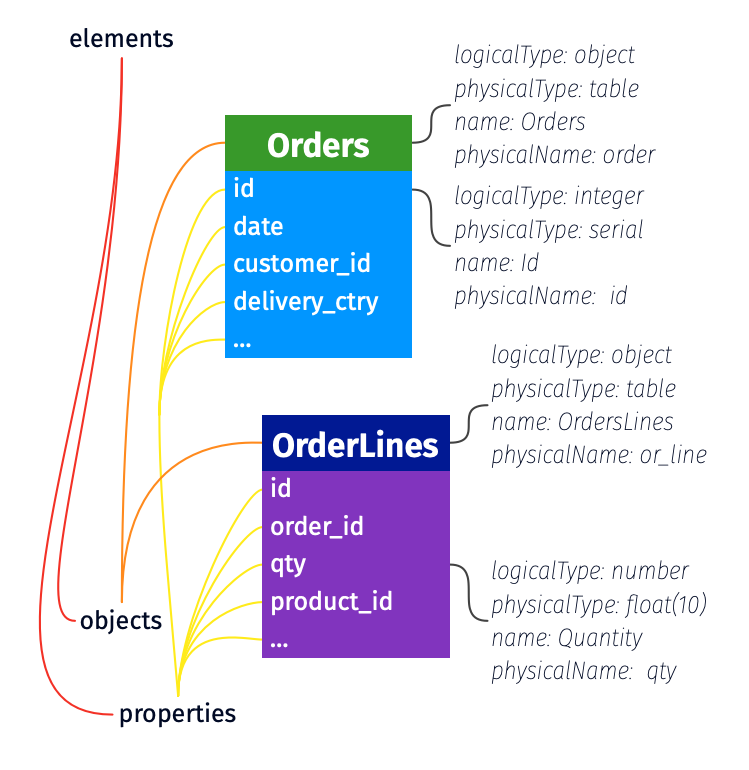
Figure 1: elements of the schema in ODCS v3.
Examples
Complete schema
schema:
  - id: tbl_obj
    name: tbl
    logicalType: object
    physicalType: table
    physicalName: tbl_1
    description: Provides core payment metrics
    authoritativeDefinitions:
      - url: https://catalog.data.gov/dataset/air-quality
        type: businessDefinition
        description: Business definition for the dataset.
      - url: https://youtu.be/jbY1BKFj9ec
        type: videoTutorial
    tags: ['finance']
    dataGranularityDescription: Aggregation on columns txn_ref_dt, pmt_txn_id
    properties:
      - id: txn_ref_dt_prop
        name: txn_ref_dt
        businessName: transaction reference date
        logicalType: date
        physicalType: date
        description: null
        partitioned: true
        partitionKeyPosition: 1
        criticalDataElement: false
        tags: []
        classification: public
        transformSourceObjects:
          - table_name_1
          - table_name_2
          - table_name_3
        transformLogic: sel t1.txn_dt as txn_ref_dt from table_name_1 as t1, table_name_2 as t2, table_name_3 as t3 where t1.txn_dt=date-3
        transformDescription: Defines the logic in business terms.
        examples:
          - 2022-10-03
          - 2020-01-28
      - id: rcvr_id_prop
        name: rcvr_id
        primaryKey: true
        primaryKeyPosition: 1
        businessName: receiver id
        logicalType: string
        physicalType: varchar(18)
        required: false
        description: A description for column rcvr_id.
        partitioned: false
        partitionKeyPosition: -1
        criticalDataElement: false
        tags: []
        classification: restricted
        encryptedName: enc_rcvr_id
      - id: rcvr_cntry_code_prop
        name: rcvr_cntry_code
        primaryKey: false
        primaryKeyPosition: -1
        businessName: receiver country code
        logicalType: string
        physicalType: varchar(2)
        required: false
        description: null
        partitioned: false
        partitionKeyPosition: -1
        criticalDataElement: false
        tags: []
        classification: public
        authoritativeDefinitions:
          - url: https://zeenea.app/asset/742b358f-71a5-4ab1-bda4-dcdba9418c25
            type: businessDefinition
          - url: https://github.com/myorg/myrepo
            type: transformationImplementation
          - url: jdbc:postgresql://localhost:5432/adventureworks/tbl_1/rcvr_cntry_code
            type: implementation
        encryptedName: rcvr_cntry_code_encrypted
Simple Array
schema:
  - name: AnObject
    logicalType: object
    properties:
      - name: street_lines
        logicalType: array
        items:
          logicalType: string
Array of Objects
schema:
  - id: another_obj
    name: AnotherObject
    logicalType: object
    properties:
      - id: x_prop
        name: x
        logicalType: array
        items:
          logicalType: object
          properties:
            - id: id_field
              name: id
              logicalType: string
              physicalType: VARCHAR(40)
            - id: zip_field
              name: zip
              logicalType: string
              physicalType: VARCHAR(15)
Definitions
Schema (top level)
| Key | UX label | Required | Description |
|---|---|---|---|
| schema | schema | Yes | Array. A list of elements within the schema to be cataloged. |
Applicable to Elements (either Objects or Properties)
| Key | UX label | Required | Description |
|---|---|---|---|
| id | ID | No | A unique identifier for the element used to create stable, refactor-safe references. Recommended for elements that will be referenced. See References for more details. |
| name | Name | Yes | Name of the element. |
| physicalName | Physical Name | No | Physical name. |
| physicalType | Physical Type | No | The physical element data type in the data source. For objects: table, view, topic, file. For properties: VARCHAR(2), DOUBLE, INT, etc. |
| description | Description | No | Description of the element. |
| businessName | Business Name | No | The business name of the element. |
| authoritativeDefinitions | Authoritative Definitions | No | List of links to sources that provide more details on the element; examples would be a link to privacy statement, terms and conditions, license agreements, data catalog, or another tool. |
| quality | Quality | No | List of data quality attributes. |
| tags | Tags | No | A list of tags that may be assigned to the elements (object or property); the tags keyword may appear at any level. Tags may be used to better categorize an element. For example, finance, sensitive, employee_record. |
| customProperties | Custom Properties | No | Custom properties that are not part of the standard. |
Applicable to Objects
| Key | UX label | Required | Description |
|---|---|---|---|
| dataGranularityDescription | Data Granularity | No | Granular level of the data in the object. Example would be "Aggregation by country." |
Applicable to Properties
Some keys are more applicable when the described property is a column.
| Key | UX label | Required | Description |
|---|---|---|---|
| primaryKey | Primary Key | No | Boolean value specifying whether the field is primary or not. Default is false. |
| primaryKeyPosition | Primary Key Position | No | If field is a primary key, the position of the primary key element. Starts from 1. Example of account_id, name being primary key columns, account_id has primaryKeyPosition 1 and name primaryKeyPosition 2. Default to -1. |
| logicalType | Logical Type | No | The logical field datatype. One of string, date, timestamp, time, number, integer, object, array or boolean. |
| logicalTypeOptions | Logical Type Options | No | Additional optional metadata to describe the logical type. See Logical Type Options for more details about supported options for each logicalType. |
| physicalType | Physical Type | No | The physical element data type in the data source. For example, VARCHAR(2), DOUBLE, INT. |
| description | Description | No | Description of the element. |
| required | Required | No | Indicates if the element may contain Null values; possible values are true and false. Default is false. |
| unique | Unique | No | Indicates if the element contains unique values; possible values are true and false. Default is false. |
| partitioned | Partitioned | No | Indicates if the element is partitioned; possible values are true and false. |
| partitionKeyPosition | Partition Key Position | No | If element is used for partitioning, the position of the partition element. Starts from 1. Example of country, year being partition columns, country has partitionKeyPosition 1 and year partitionKeyPosition 2. Default to -1. |
| classification | Classification | No | Can be anything, like confidential, restricted, and public to more advanced categorization. |
| authoritativeDefinitions | Authoritative Definitions | No | List of links to sources that provide more detail on element logic or values; examples would be URL to a git repo, documentation, a data catalog or another tool. |
| encryptedName | Encrypted Name | No | The element name within the dataset that contains the encrypted element value. For example, unencrypted element email_address might have an encryptedName of email_address_encrypt. |
| transformSourceObjects | Transform Sources | No | List of objects in the data source used in the transformation. |
| transformLogic | Transform Logic | No | Logic used in the column transformation. |
| transformDescription | Transform Description | No | Describes the transform logic in very simple terms. |
| examples | Example Values | No | List of sample element values. |
| criticalDataElement | Critical Data Element Status | No | True or false indicator; If element is considered a critical data element (CDE) then true else false. |
| items | Items | No | List of items in an array (onlyapplicable when logicalType: array) |
Logical Type Options
Additional metadata options to more accurately define the data type.
| Data Type | Key | UX Label | Required | Description |
|---|---|---|---|---|
| array | maxItems | Maximum Items | No | Maximum number of items. |
| array | minItems | Minimum Items | No | Minimum number of items. |
| array | uniqueItems | Unique Items | No | If set to true, all items in the array are unique. |
| date/timestamp/time | format | Format | No | Format of the date. Follows the format as prescribed by JDK DateTimeFormatter. Default value is using ISO 8601: 'YYYY-MM-DDTHH:mm:ss.SSSZ'. For example, format 'yyyy-MM-dd'. |
| date/timestamp/time | exclusiveMaximum | Exclusive Maximum | No | All values must be strictly less than this value (values < exclusiveMaximum). |
| date/timestamp/time | exclusiveMinimum | Exclusive Minimum | No | All values must be strictly greater than this value (values > exclusiveMinimum). |
| date/timestamp/time | maximum | Maximum | No | All date values are less than or equal to this value (values <= maximum). |
| date/timestamp/time | minimum | Minimum | No | All date values are greater than or equal to this value (values >= minimum). |
| timestamp/time | timezone | Timezone | No | Whether the timestamp defines the timezone or not. If true, timezone information is included in the timestamp. |
| timestamp/time | defaultTimezone | Default Timezone | No | The default timezone of the timestamp. If timezone is not defined, the default timezone UTC is used. |
| integer/number | exclusiveMaximum | Exclusive Maximum | No | All values must be strictly less than this value (values < exclusiveMaximum). |
| integer/number | exclusiveMinimum | Exclusive Minimum | No | All values must be strictly greater than this value (values > exclusiveMinimum). |
| integer/number | format | Format | No | Format of the value in terms of how many bits of space it can use and whether it is signed or unsigned (follows the Rust integer types). |
| integer/number | maximum | Maximum | No | All values are less than or equal to this value (values <= maximum). |
| integer/number | minimum | Minimum | No | All values are greater than or equal to this value (values >= minimum). |
| integer/number | multipleOf | Multiple Of | No | Values must be multiples of this number. For example, multiple of 5 has valid values 0, 5, 10, -5. |
| object | maxProperties | Maximum Properties | No | Maximum number of properties. |
| object | minProperties | Minimum Properties | No | Minimum number of properties. |
| object | required | Required | No | Property names that are required to exist in the object. |
| string | format | Format | No | Provides extra context about what format the string follows. For example, password, byte, binary, email, uuid, uri, hostname, ipv4, ipv6. |
| string | maxLength | Maximum Length | No | Maximum length of the string. |
| string | minLength | Minimum Length | No | Minimum length of the string. |
| string | pattern | Pattern | No | Regular expression pattern to define valid value. Follows regular expression syntax from ECMA-262 (https://262.ecma-international.org/5.1/#sec-15.10.1). |
Expressing Date / Datetime / Timezone information
Given the complexity of handling various date and time formats (e.g., date, datetime, time, timestamp, timestamp with and without timezone), the existing logicalType options currently support date, timestamp, and time. To specify additional temporal details, logicalType should be used in conjunction with logicalTypeOptions.format or physicalType to define the desired format. Using physicalType allows for definition of your data-source specific data type.
version: 1.0.0
kind: DataContract
id: 53581432-6c55-4ba2-a65f-72344a91553a
status: active
name: date_example
apiVersion: v3.1.0
schema:
  # Date Only
  - name: event_date
    logicalType: date
    logicalTypeOptions:
      format: "yyyy-MM-dd"
    examples:
      - "2024-07-10"

  # Date & Time (UTC)
  - name: created_at
    logicalType: timestamp
    logicalTypeOptions:
      format: "yyyy-MM-ddTHH:mm:ssZ"
    examples:
      - "2024-03-10T14:22:35Z"

  # Date & Time (Australia/Sydney)
  - name: created_at_sydney
    logicalType: timestamp
    logicalTypeOptions:
      format: "yyyy-MM-ddTHH:mm:ssZ"
      timezone: true
      defaultTimezone: "Australia/Sydney"
    examples:
      - "2024-03-10T14:22:35+10:00"

  # Time Only
  - name: event_start_time
    logicalType: time
    logicalTypeOptions:
      format: "HH:mm:ss"
    examples:
      - "08:30:00"

    # Physical Type with Date & Time (UTC)
  - name: event_date
    logicalType: timestamp
    physicalType: DATETIME
    logicalTypeOptions:
      format: "yyyy-MM-ddTHH:mm:ssZ"
    examples:
      - "2024-03-10T14:22:35Z"